SIGN UP FOR SALLY'S SEA OF SONGS NEWSLETTER!


Showing posts with label Assessment. Show all posts


Blog header image showing a music hallway bulletin board with student rhythm compositions and the title “How to Create Meaningful Music Bulletin Boards with Simple Student Work.”


How to Create Meaningful Music Bulletin Boards with Simple Student Work


Hallway bulletin boards can be especially challenging for music teachers. So much of what we do in class is active and sound-based — singing, playing, moving, and creating — that it’s not always obvious how to turn that learning into student work you can display. I, for one, hated to take time to get out pencils and paper!

But with a few intentional choices, elementary music bulletin boards can become meaningful snapshots of learning, helping hallway bulletin boards show what students are really doing in music class.

(If you’re thinking more about instructional displays inside the room, I shared ideas for that in a previous post on making classroom walls work for you. This post focuses specifically on hallway boards.)


Why Student Work Belongs on Music Hallway Bulletin Boards


When students see their work displayed in the hallway, it sends a powerful message: what we do in music matters. It builds pride and ownership, while also quietly advocating for your program.

Parents, administrators, and other students may never sit in on a lesson, but they do walk past your hallway board. A display that features real student work helps them see that music learning is creative, intentional, and standards-based.

In practice, this might look like a rhythm composition display mounted on leaves or flowers, surrounded by photos of students creating. Or a concert reflection board with short student quotes paired with rehearsal pictures. Even a “Caught Making Music” photo collage counts as student work when it documents the learning process.


What Counts as Student Work in the Music Classroom


Elementary music hallway bulletin board showing student work for the song “Star Light, Star Bright,” including rhythm notation and photos of students playing instruments.
One of the biggest hurdles with hallway displays is defining student work in a subject where learning happens in sound.

Student work can include:
  • Rhythm or melody compositions
  • Short written reflections or sentence starters
  • Drawings connected to music stories
  • Group-created work
  • Photos of students singing, playing instruments, moving, or composing
If students made musical decisions, engaged in the process, or reflected on their learning, it counts!


What to Include on a Meaningful Music Bulletin Board


When planning hallway boards, think documentation, not decoration. A strong music bulletin board often includes a mix of:

  • Student work (compositions, reflections, drawings, group pieces)
  • Photos of students making music
  • A clear lesson objective
  • Music standard(s)
  • A short rubric or success criteria
  • Student voice (quotes or reflection prompts)

You don’t need all of these every time. Even three or four elements can turn a hallway board into a clear snapshot of learning.


Fall-themed elementary music bulletin board showing rhythm composition standards and a rubric exemplar displayed inside oak leaf shapes.

Sample Rhythm Composition Bulletin Board (Objective, Standard, and Rubric)


Including an objective, standard, and rubric doesn’t have to be complicated. A single half-sheet posted beside the display is enough.

Objective
Students will create and notate a 4-beat rhythm pattern using quarter notes and paired eighth notes.

Standard
MU:Cr1.1.2a – Generate musical ideas within a given structure.

Simple Rubric

4 – Exceeds: Accurate rhythm, clear notation, neat presentation
3 – Meets: Accurate rhythm with minor notation errors
2 – Developing: Some note value errors
1 – Beginning: Incomplete or unclear rhythm

This small addition does a lot of heavy lifting — it shows what students learned, how their work was assessed, and how creative projects align with standards.  


One important note: I never display student work in the hallway with grades written on it. I use the rubric to guide assessment and then choose examples that meet the criteria, but the papers themselves stay ungraded. Ungraded hallway displays promote a growth mindset by emphasizing progress and learning over performance labels.

Music Bulletin Board Ideas That Show Real Learning


Fall-themed music bulletin board displaying rhythm composition standards and a rubric exemplar for elementary music students.

Some hallway-friendly ideas that work especially well in music include:
  • Rhythm composition galleries (leaves, flowers, shells, notes)
  • “Caught Making Music” photo boards
  • Concert or field trip reflection displays
  • Music story connections (like sound stories or children's literature)
  • “Behind the Music” boards that highlight one focus skill

Each one helps answer the hallway question: What do students actually do in music class?

(If you’re looking for inspiration across the entire school year, I’ve also put together a full post with year-long music bulletin board ideas made with student work, organized month by month.)


How to Keep Music Hallway Bulletin Boards Manageable


Hallway boards shouldn’t steal your planning time.

A few tips that help:

  • Reuse the same background and swap out student work
  • Rotate displays by unit, not by month
  • Feature different grade levels throughout the year, so every class gets a turn in the spotlight
  • Use group work when possible
Remember: photos count as student work!

Thoughtfully rotating grade levels and displays turns your hallway board into an ongoing story of growth, creativity, and progress.


Let the Music Be Seen


Elementary music student rhythm compositions displayed on flower-shaped worksheets as part of a Blooming Rhythms bulletin board.

Music learning is often invisible — unless we help others see it. Hallway bulletin boards give us a simple way to advocate for our programs, celebrate students, and document learning without saying a word.

When student work, photos, objectives, and rubrics live together on the wall, your board becomes more than decoration. It becomes evidence.


If you’re looking for an easy place to start, my Falling Rhythms (fall leaves) and Blooming Rhythms (flower theme) rhythm composition sets are designed with hallway displays in mind — with assessment and standards already built in, so you can spend less time at the bulletin board and more time making music.


Musically yours,


Practical Ways to Use Boom Cards Effectively in Elementary Music

Explore the Versatility of Boom Cards.

With 600+ students, I'll have a paperless classroom, please!

Many of us discovered the awesomeness of self-checking Boom Cards when we were plunged into distance learning during the pandemic. Now, discover the other ways to effectively use Boom Cards to support student learning in a paperless classroom!

Can I say paperless just one more time? My desk gets simply overrun with paperwork. I'm sure it is the desk's fault, right?! In addition to all of the other versatile uses below, this is key for me. The self-checking feature is great when I need data or when I wish students to be able to work independently, but the paperless is great ALL the time!

What are Boom Cards?

 Boom Cards are a type of digital task card that offers an interactive and self-checking learning experience. They are internet activities designed to be used on computers, laptops, tablets, and interactive whiteboards and are a fun and engaging way to deliver lessons, quizzes, and assessments. 

These digital task cards are interactive, allowing students to directly interact with the content. Students love the video game feel to the activities and become totally engaged. I love the fact that they are self-checking, providing immediate feedback on their answers. With Boom Cards, teachers can create engaging and interactive learning experiences that are easy to administer and provide real-time feedback to students.

Read on to see how I use digital resources like Boom Cards in my classroom.


Display on an Interactive Whiteboard
Use digital resources and Boom Cards as an introduction or a review of music concepts.
Use as a preview or demonstration prior to assigning them for individual or center use.

Send to Classroom Computers for Use in Music Centers
Assign "Fast Pass" self-grading decks for use in music centers when you want to keep students engaged but don't necessarily need to keep data. (more about this in a minute...)

Send to Individual Student Devices
Assign to Individual student Boom accounts for easy access to the data record of student scores.
Assign through Google Classroom or other learning management systems for individual review or assessment.


A Few More Features

A great feature of Boom Cards is the ability to use fast pins, which are links that make it simple to distribute the cards to individual student devices or to a classroom music center computer. This makes it easy to use Boom Cards in a variety of settings and ensures that students have access to the resources they need to succeed. Fast Pins + Free Account = All you need to get started!
 
One of the advantages of Boom Cards is that they can be easily integrated with other digital tools. For example, you can add the link to your Google Classroom or learning platform to make it easy for students to access the cards. 
 
With a premium account, Boom Cards can also be used as an independent assessment for each student, providing valuable data on their progress and performance. Administrators love data, and with the engaging video game-like format, students won't even know they are being assessed!

Ready to Start? Try a Free Sample Deck

Have you tried them with your music students? Check out this free sample: Feed the Starfish Instrument Family Edition. After signing in to your account, click on "Add to Library" to get started!


These resources are internet activities and require an internet connection for use. 

When purchasing Boom Cards on TPT, you will download a PDF document that includes directions and the link to access your resource on Boom Learning.

As you explore these new resources, be sure to click on the link in each product description to see the preview on the Boom Learning site!

I hope you will consider these Boom Cards decks for use with your students!


Musically yours,


Practical Ways to Use Boom Cards Effectively in Elementary MusicPractical Ways to Use Boom Cards Effectively in Elementary Music
. 


Teacher icons created by Bert Flint - Flaticon Class icons created by Dreamstale - Flaticon Online class icons created by Freepik - Flaticon


Need some pirate treasure? Let me spill the dubloons! Here are some super simple resources to add a little pirate fun to your music lessons!

Questions You Might Ask 

"Why would I need pirate resources?"  Themed lessons can add a little bit of extra engagement for students!  Make believe activities are a part of childhood.  Incorporating make believe into your lessons gives students a safe way to try things in a different way.  Perhaps taking on a pirate persona for a day might bring out a little more boldness in your students. 

"When can I use these activities?" Talk Like a Pirate Day is September 19. October is a great month for dress-up and make believe.  Spring months are also a great time for sea shantys and treasure hunts.  You are free to decide when a theme might fit into your existing curriculum!

Now, let's get into the resources and how to use them. 
Image of pencils on teal background

The scene:  All the teachers are sitting in the same school professional development session where the principal or curriculum coach is describing the new district focus for the year.  Writing across the curriculum.  All teachers are to include writing in their lessons.  Have you been there? I have!  How are we music teachers to do this when we only see students for a short time each week?  Read on for some easy ways to incorporate writing into your music classes.

Group Collaborative Writing

When I pressed the issue of limited time with administration, I discovered that everybody doesn't always have to write!  We could collaborate on our writing as a whole group or in small groups or pairs and it was fine to mix it up.   This was freeing!  We could work on a description of our music activity or a report on a field trip as a group.  

I used this strategy at the beginning, as I was developing procedures for our writing time.  These group collaborative writings also served as demonstrations to teach the students how to write on their own.  I would be the one to take notes and display them with the projector or with a document camera so the students could add on or edit.  I'll share more specific ideas below.

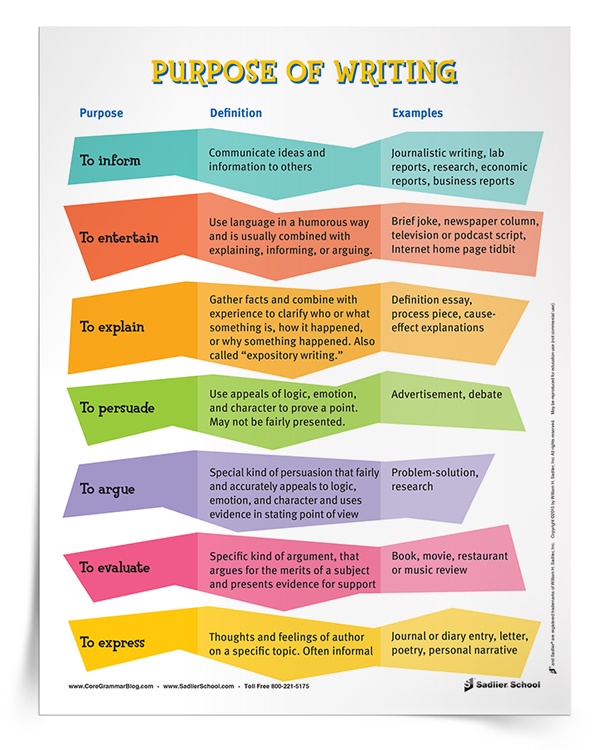
Writing for Different Purposes

In the beginning, I admit that I was envisioning many paragraphs and editing and dictionaries (which I don't have in my class), and whew! That was too much! Then I learned that the English Language Arts standards included writing for different purposes. This could be the answer! 


TO INFORM - share facts and other information.
  • Composers or Music History topics fit in here. 
  • One quick possibility is to present your lesson, then have each student write one thing they remember on a sticky note.  Gather the sticky notes and rearrange them into a paragraph.  Students will call out any missing facts to complete your class report! 
  • For a longer project, allow students to research a composer, genre, or musician and write a report with guidelines that you provide.

TO EXPLAIN - to tell what, how, and why about a topic. 
  • Explain how to play a recorder, ukulele, or other classroom instruments.
  • Explain how to do a folk dance.
  • Explain a new music vocabulary term.
  • Play a piece of music and let them write instruments, tempo, dynamics they hear, identify (or guess) the genre, give a possible use for the music. Many music educators call this SQUILT - Super Quiet Un-Interrupted Listening Time.

TO NARRATE - to tell a story. 
  • The story can be made up or truthful. The story can be long or short.
  • Write a simple story to cover the beginning, middle, and end. For younger students, this story could consist of 3 sentences! For older students, the story could be 3 paragraphs and include more details.
  • Add instruments or songs to the story to create a mini-performance. 

TO PERSUADE - state an opinion or goal and support it with reasons and supporting details in order to convince the reader to agree, take action, or both. 
  • Write school newsletter announcements for upcoming programs.
  • Persuade classmates to join the choir or other performing groups.
  • Persuade others to listen to a new genre of music.

ENTERTAIN - to engage the reader using techniques such as humor, adventure, or suspense.
  • Play music and have students write or draw what they picture.  Create a great story to go along with the music!
  • Give students an opportunity to present their drawings or writing and explain them to the class.
  • As an extension, write a brief explanation of the picture.  This would make a great bulletin board display.

EXPRESS - to share thoughts or feelings.
  • Write about their feelings when they were performing on stage.
  • How does this music make you feel? Why? Use music vocabulary to support your ideas.
  • Writing poetry that could be set to music is a great option. 
  • As a preliminary step to poetry writing, give students a word and ask the class to write as many rhyming words as they can think of.

EVALUATE - describe the positive and negative aspects and present evidence for support.
  • Book, music, or concert reviews fit this category.
  • Evaluating music and music performances is a part of state and national music standards.
  • Begin with short reviews of video performances.  Include music vocabulary and evidence from the video to support the evaluation.
  • Reflect on school concerts.  My students always love to see themselves in a video!  Check out how I use this type of writing following every concert here.

Helpful Resources


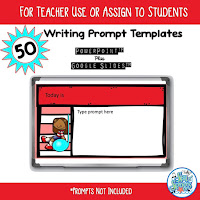
Writing prompt templates help me organize my plans for writing in the music room, especially last year when we were switching between virtual and in-person classes.  The writing prompt templates are just the size to write a question or prompt to guide student writing. 


For a quick write, consider using sticky notes, whiteboards, sentence strips, or exit tickets.  These blank exit tickets are great for short questions or statements about what students learned in class. 


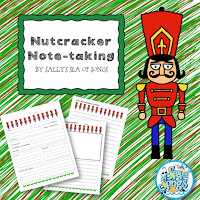
For longer projects, journals or special writing paper are more appropriate.  Those special writing papers really make a nice bulletin board showing off student work!  Nutcracker Notetaking includes a graphic organizer which I use as a space for students to take notes while we are reading the story of the ballet.  Then, the completed organizer serves as the pre-writing for a report on our field trip to the ballet.   


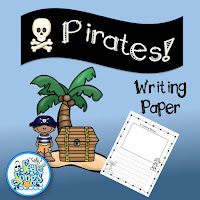
Another example of a special writing paper comes in this Pirate Writing Paper set.  This was perfect for my first graders to use following a trip to see the musical, How I Became a Pirate.  


Free Writing Prompt List 

Looking for more ways to integrate writing into your music classroom? Grab my free list of 25+ writing prompts designed just for music teachers! 
  1. Fill out the form at the bottom of this page. 
  2. Check your inbox to receive the password to the  Members Area of this blog. 
  3. Come back here and click on the Members link at the top of the page to find the Free Resource Library.
Let’s make writing in music class fun and meaningful!

Just Do It!

I am a firm believer in arts integration.  While it is really awesome when I can help classroom teachers authentically integrate music into their lessons, I also need to be willing to integrate other areas of the curriculum into my classes.  

It takes the creativity of an arts educator to extract principles from those one-size-fits-all professional development sessions and integrate them into our classes. You are that creative music teacher!  You can do this! Our students are better served when they can make connections across the curriculum.

As I said at the beginning, everyone doesn't have to write every time.  Every writing activity doesn't have to end up on a bulletin board, although writing does make for a great display.  Some of the above examples are very quick and easy.  Others may take the entire class period or more.  The key is to just do it as a natural part of your music lesson.  

How do you incorporate writing into your music lessons?  Let me know in the comments!


Image of pencils on teal backgroundImage of pencils on teal background


References

https://www.sadlier.com/school/ela-blog/teaching-students-the-many-purposes-of-writing
https://literacyideas.com/authors-purpose/
https://forms.hmhco.com/assets/pdf/journeys/Journeys_CC_Writing_Handbook_Gr6.pdf


Assessing student performances is time-consuming!  It is often difficult to make an accurate judgment on the fly, because things happen so fast that it is hard to "record" all of the info in our brains in real time.  Recording student performances for assessment purposes has been a teacher trick that solved this problem for many years.  With the growing use of individual technology devices in schools everywhere, recording student performances is easier than ever.


I am fortunate to have access to a class set of iPods.  For this assessment project, we used the video camera that is built in to the iPod for the video and a Google Form for the rubric.  The following steps assume that your students are ready for performance.

Step 1 Demonstrate

Most kids have some experience with pictures and recordings on phones, so you may or may not have to do too much explaining.  I moved through a quick demonstration just to reinforce the fact that students should all be working with the video camera, how to switch from the still camera to the video camera, how to switch to the front-facing camera, and how to start and stop the recording.

Before passing out the iPods, the school/class rules for use were reviewed.  My backup plan for students who choose not to follow the rules is to take their iPod away, then I recorded them with my iPod.


Step 2 Record

I am fortunate to have a nice sized room and medium sized classes, so we were able to spread around the perimeter of the room, with a few scattered in the middle, so that students had personal space and the sound from one student didn't end up in another's recording.  If space is an issue, try the buddy approach, with one student as the videographer while the partner is performing.


My 5th grade students were singing a blues verse that they composed to a prerecorded track.  I played the track and let them record a practice version.  They ended up getting 3 or 4 chances to get a recording that they were satisfied with.

Step 3 Student Self-Assessment

Students were given time to watch their video several times, and then it was time to complete a self-assessment rubric.  We used a rubric that students had helped to create in a previous lesson.  I created a Google Form with one question for each performance dimension.  The levels of performance were checkboxes, to facilitate ease of use for the students.


As an extra layer of technology fun, I created a QR code to link to the Google Form.  Students scanned the code to bring up the form on their iPods.  QR codes could be displayed on your IWB, enlarged to post on classroom walls, or printed on paper and distributed to students.  Once the rubric is open on the iPods, students only have to tap the checkboxes to record their ratings.

 You can make your own copy of the actual rubric by following this link: 

Blues Performance Assessment Rubric

Step 4 Teacher Assessment

I couldn't wait to see their videos!  After school, when all was quiet, I watched each one.  Using the exact same rubric, I recorded my rating for their performance.  To indicate which rating was the teacher rating, I entered the student name followed by **********.

The cool thing about Google Forms is that all of the responses are recorded into a spreadsheet, making it very easy to read, and even allowing the resorting of data if necessary.  You can see from the excerpt below that many times the students were harder on themselves than I was!


Step 5 Teacher Reflection

I loved this project because the student engagement was so high that the ratings were a very accurate representation of the student's work.  In the future, I think I will add a short written component to the student self-assessment, asking them to explain why they gave themselves the rating that they did.

Sharing our Project  

The QR worksheets, links, Yonder Come Day videos, and our presentation slides from SCMEA can be found here:


Please comment on whether this use of technology would be useful to you!

More on how QR codes can be used to facilitate student research projects can be found in this post: QR Codes & Student Engagement


Click on the pictures for more Fermata Fridays or Tech Talk Tuesday posts!


Whew! Winter concert is over for this year! Time to breathe.

This year's concert was titled "Dream BIG!"  Students in 3rd, 4th, and 5th grades were featured, and the program consisted of songs from Music K-8, a scarf routine to the Russian Dance from the Nutcracker, bucket drumming to the Nutcracker March, and a combination dance/drumming/chorus number.  One highlight was when our principal played his guitar along with one of the bucket drumming groups!


Write the Room activities are all the rage in K-1-2 classrooms, so I thought—why not bring this popular movement-based activity into the music room? Since many of my students were already familiar with the procedures, introducing Write the Room was smooth, even with our limited class time.

Why Write-the-Room?

1. It’s Movement-Based Learning

Write the Room activities allow students to move around the classroom, giving them a chance to "get the wiggles out" while meeting music standards. It turns what could be static learning into an active exploration, which is especially beneficial in music.

2. It’s a Flexible Framework

Write the Room can be adapted to various topics, making it a versatile framework for teaching concepts like music symbols, instrument names, dynamics, rhythm, melody, and more. The process stays the same, but the content changes, so it’s easy to revisit again and again without reinventing the wheel.

How to Use Write the Room in Music Class: 3 Simple Approaches

1. Practicing Music “Handwriting”

If you’ve ever "fussed" about stems being on the wrong side of notes, Write the Room can help students get it right. By tracing and writing music symbols as they find them around the room, students get valuable practice with music "handwriting" that will support future composition projects. Start with single notes or symbols and progress to 4- or 8-beat rhythm or tonal patterns as students build confidence.

2. Building Music Vocabulary

Naming instruments correctly was a challenge for my students, so I introduced Write the Room to help them work with instrument names in a fun, low-pressure way. After seeing success with instruments, we expanded to music symbols and other terms, reinforcing vocabulary in a way that felt natural and engaging.

3. Assessment Options

Write the Room is also a great assessment tool. One method is to place definition cards around the room and give students a recording sheet with only the terms. Their job is to find the matching definition and copy it down, or even draw a picture of the symbol or instrument. Here are some variations we’ve tried


  • Matching Labels and Pictures: Post labels next to instrument pictures for students to practice reading and writing each name.
  • Label-Only Cards: Hang just the labels, and let students match by writing the word and drawing the instrument.
  • Picture-Only Sheets: Provide students with sheets that have only pictures, and have them find the label to copy down the name.
  • Focus on Instrument Families: Sometimes, we focus on one instrument family at a time—woodwinds, brass, etc.—to deepen understanding.
  • Numbered Matching: Number the picture and label cards separately, hanging them around the room for students to match.
  • Draw and Label by Family: Have students find an instrument from a particular family, write its name, and draw it.

Ready-to-Use Resources

Preparing all the cards and materials for a Write the Room activity can take some time. Between finding images, creating labels, and organizing everything, the prep work can add up. That’s where ready-made resources come in handy—they save time and let you focus on what matters most: teaching!


Feel free to check out my store for Write the Room: Instruments of the Orchestra and other print-and-go rhythm, tonal, and instrument Write the Room activities. Let the rhythm of Write the Room guide your students in engaging, hands-on learning adventures that keep the music and learning in tune!

 
Thanks for reading!